
Pikmykid Parent
Sachi Tech IncProductivity
3.6572.00 Reviews
- Version
- 4.5.15
- Installs
- 100.00K
- Age Rating
- Everyone
Screenshots

Our Review of Pikmykid Parent
 Analysis by Appyee
Picking up a child from school sounds simple until the afternoon turns into a chain of messages, changing plans, traffic, and a staff member who needs to know exactly who is arriving. Pikmykid Parent is built for that narrow but important part of family life: helping parents handle school pickup through a dedicated mobile app rather than relying on scattered texts or last-minute phone calls. I found its value less in entertainment or broad family organization and more in giving pickup instructions a clear place to live.
That focus matters. This is a free productivity app from Sachi Tech Inc, listed for everyone and available for Android devices running version 7.0 or later. It has passed the stage of being an obscure experiment, with over one hundred thousand installs, but its average score sits at 3.6 from around nine hundred ratings. I read that combination as a reason to approach it practically: many families may find the school-pickup workflow useful, while the experience can still depend heavily on how consistently a child’s school uses the system.
I spent time looking at the app as a parent would, asking a more important question than whether it looks polished: can I understand what is happening, keep control of my pickup information, and avoid unpleasant surprises when personal family details are involved? My answer is cautiously positive, with one major condition. Pikmykid Parent makes the most sense when the school has already adopted it and communicates clearly about how parents are expected to use it.
What Pikmykid Parent is really for
The app is not a general calendar, a family chat room, or a replacement for every school communication channel. Its identity is much more specific. It is meant to sit between the parent, the school, and the pickup process, helping the right information reach the people coordinating dismissal. That makes it especially relevant for families with regular school pickups, changing authorized adults, or more than one child whose schedules need to be handled carefully.
In a typical afternoon, I would use it before leaving home to check the pickup arrangement and make sure the intended plan is still correct. If another authorized person is collecting the child, the important task is not simply sending a casual message. It is making sure the school receives the change through the channel it recognizes. That distinction is where a dedicated pickup app can be more useful than a text sent to a teacher who may be busy or unable to verify it.
The app’s best quality is therefore organizational rather than flashy. It gives parents a purpose-built place for a school-related task that is easy to mishandle when information is spread across email, paper notes, messaging apps, and verbal instructions. I would not install it expecting a complete parenting toolkit. I would install it because my child’s school uses it as part of dismissal.
The first trust question is whether the school actually uses it
Before creating an account or changing your routine, I would confirm the school’s exact process. A parent can have the app installed and still gain little if the school expects a different method for absences, early release, transportation changes, or emergency pickup adjustments. The app cannot independently solve a communication gap between a family and a school.
This is also the first meaningful limitation. The quality of the experience is partly outside the parent’s control. If staff update information late, explain the workflow poorly, or continue using several competing systems, the app may feel like another obligation instead of a simplification. In that situation, the right response is not to assume the app is always wrong or always right; it is to ask the school which action is officially recognized.
I would also keep a backup understanding of the school’s normal contact method. That does not undermine the app. It is sensible because pickup is time-sensitive, and an app should not be treated as the only possible route for an urgent issue unless the school explicitly says so. A clear routine reduces the risk of arriving at dismissal with an outdated plan and no idea how to correct it.
A realistic afternoon workflow
Imagine that I normally collect my child, but a meeting runs late. My first step would be to open the parent app and review the pickup arrangement rather than immediately calling several people. If an authorized relative is taking over, I would follow the school’s in-app procedure, check that the change is represented correctly, and then make sure the relative knows what the school expects at pickup.
The useful insight here is that the app should be treated as a record of the school-facing instruction, not as a private note for my own memory. I would avoid assuming that changing something on my phone automatically overrides every other school rule. If the school requires a separate notification or identification step, that remains important. The app can organize the request, but it does not remove the parent’s responsibility to follow the full dismissal policy.
For families with several children, I would review each child separately before confirming anything. A rushed tap can be more troublesome when siblings have different dismissal arrangements or different authorized adults. Taking a few seconds to check names and plans is a small habit, but it is exactly the kind of habit that prevents a convenient tool from becoming a source of confusion.
Permissions, data, and the moments that deserve care
Pickup information is sensitive even when it looks ordinary. It can connect a child with a parent, relative, caregiver, school, and time of collection. I do not need dramatic assumptions to take that seriously. The practical trust test is whether I understand what I am entering, why it is needed for the school workflow, and which choices remain under my control.
When setting up the app, I would read each permission request and avoid granting access that does not appear necessary for the task I am trying to complete. I would also check the phone’s permission settings afterward, especially if the app asks for access to device functions that I do not expect to use. This is not a criticism of a particular permission; it is a useful discipline for any app handling family-related information.
I would pay special attention during moments when plans change quickly. Adding or selecting another pickup person is more sensitive than simply opening a screen. Before confirming, I would check the spelling, relationship, and intended child, then make sure the person understands that being listed in an app does not necessarily replace any identification requirement at school. The safest workflow is deliberate, even when the interface encourages speed.
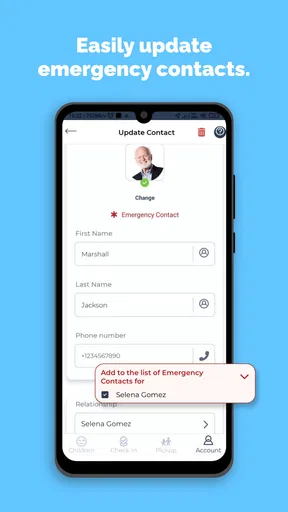
Another good habit is to review the account when the school year or family arrangement changes. A former caregiver, an old phone number, or an outdated pickup pattern should not remain active just because it was convenient months ago. If the app presents account or contact controls, I would use them to keep the information current. If a change is unclear, I would ask the school rather than guessing which option carries official weight.
What I would check before trusting the routine
I would confirm that the school considers Pikmykid Parent an official part of its dismissal process.
I would review the selected child and pickup arrangement before submitting a change.
I would keep contact details and authorized pickup information current.
I would inspect phone permissions and remove access that is not needed for my use.
I would learn the school’s fallback method for urgent changes or technical problems.
These checks are more useful than judging trust from appearance alone. A clean screen does not tell me how a school handles a late change, and a familiar login does not automatically explain how long information remains relevant. My confidence would come from understanding the process and seeing that the app gives me visible choices, not from assuming that convenience equals privacy.
Account control matters more than a quick setup
Parents should be able to recognize which information belongs to their own account and which part is controlled by the school. That distinction helps prevent false expectations. For example, an account may let me update a personal detail while the school still controls the official student record or the final dismissal procedure. I would look for clear labels and confirmation messages, and I would avoid making repeated edits simply because the first result was not immediately obvious.
If I were sharing a device with another caregiver, I would be especially careful about signing out or using the phone’s own security features. A pickup app is not the kind of tool I would leave open on a public or shared device. I would also avoid saving sensitive details in screenshots or casual messages, since those copies can outlive the original plan and become difficult to manage.
Parents may also wonder whether they can use the app independently of the school. In practice, I would not count on that. The app’s usefulness depends on the school-side process, so downloading it alone does not guarantee that a pickup request will be recognized. This is one of the clearest situations where asking the school first saves time and avoids a dangerous misunderstanding.
Where the app feels stronger than ordinary alternatives
The usual alternatives are a phone call, an email, a paper note, a school messaging service, or a text to a teacher. Each can work, but each has a weakness in a busy dismissal environment. A phone call may not be answered at the right moment. An email can be overlooked. A paper note can become outdated. A text may reach the wrong person or lack the formal context the school needs.
Pikmykid Parent has an advantage when it gives the school a recognizable, structured route for pickup information. That structure can reduce the ambiguity of a message such as “Grandma is coming today,” especially when a parent needs to communicate a change rather than a permanent arrangement. The benefit is not that the app makes every decision for me; it is that it can place the decision in the workflow the school has chosen.
There is a trade-off, though. A direct call may be better for an unusual emergency when the school has instructed parents to speak with staff immediately. A general school communication app may be better if I need academic notices, attendance information, and teacher communication in the same place. A family calendar may be better for coordinating parents privately. Pikmykid Parent is strongest when the problem is specifically school pickup, not when I need one universal family dashboard.
Small habits that make the app safer and less frustrating
My first tip is to open the app before I am already parked or rushing through traffic. Pickup changes are easier to review calmly at home, and I am less likely to select the wrong child or overlook a confirmation. My second tip is to treat every temporary change as temporary: after the unusual pickup is finished, I would check whether the normal plan needs to be restored.
My third tip is to explain the process to every backup caregiver before the day of pickup. The caregiver may need to know where to go, what identification the school expects, and whether the parent must complete an additional step. An app notification alone is not a complete handoff. The human part of the arrangement still matters.
My fourth tip is to take error messages seriously. If the app shows an unexpected status, refuses a change, or behaves differently from the school’s instructions, I would stop repeating the same action and contact the school through its approved channel. Repeated tapping can create more confusion, particularly when I am unsure whether the first request was accepted.
Finally, I would keep the app updated when updates are offered, but I would not assume that an update fixes a school-process problem. The current version is 4.5.15, and the app has been available since July 2, 2021, so it is an established product rather than a brand-new release. Still, an established app can have a learning curve, and parents should judge it by whether it works clearly within their school’s routine.
Who should use it, and who should look elsewhere
I think it is a good fit for parents whose schools actively use Pikmykid for dismissal and who regularly deal with changing pickup arrangements. It can also help caregivers who want one recognized place to check the plan instead of relying on a long message thread. Families with complicated schedules may appreciate the discipline of confirming the intended pickup before leaving home.
I would be more hesitant for a parent whose school barely mentions the app or continues to require a separate process for every change. I would also skip it as a general productivity download if my real need is grocery planning, shared calendars, homework tracking, or family messaging. Those jobs call for different tools, and forcing a pickup-specific app to handle them would only make the household’s system more fragmented.
Parents who are uncomfortable entering child-related or caregiver information into a school-connected service should first review the app’s visible account controls and the school’s own explanation of the process. If those explanations are unclear, that is a reason to pause and ask questions before relying on the app, not a reason to enter more information and hope the workflow becomes understandable later.
My cautious verdict
After looking at Pikmykid Parent as a real-world pickup tool rather than a simple download, I see a focused app with a credible everyday purpose. Its strongest contribution is giving parents a structured way to participate in school dismissal, particularly when another authorized adult may need to take over. The free price and Everyone content rating make it easy to try, while support for Android 7.0 and later keeps it accessible on older compatible devices.
My reservation is not about the idea; it is about dependence on the surrounding school process. The 3.6 average from roughly nine hundred ratings suggests a mixed experience, and that feels believable for an app whose usefulness can vary with implementation, communication, and account handling. I would not call it a universal replacement for calls, email, or a family calendar.
I would recommend trying it when the school clearly supports it, then spending a little time learning the controls before the first busy pickup. Keep personal information current, verify every change, and know the fallback contact method. The safest way to use Pikmykid Parent is as one carefully checked part of the school’s dismissal system, not as an automatic guarantee that a pickup change has been understood. With that expectation, it can earn a place in a parent’s routine; without it, another communication method may be the more dependable choice.
Verdict
Strengths of Pikmykid Parent
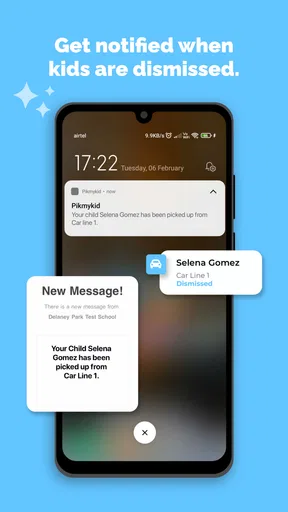
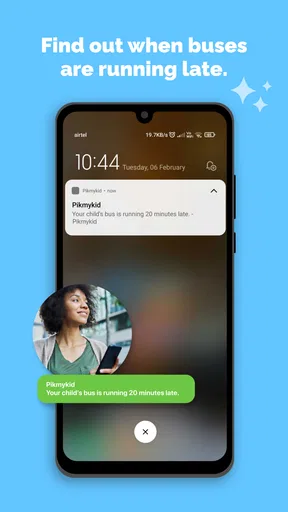
- Real-time pickup updates help parents know when to leave home.
- Supports multiple children and pickup arrangements in one account.
- Useful notifications can reduce confusion during dismissal time.
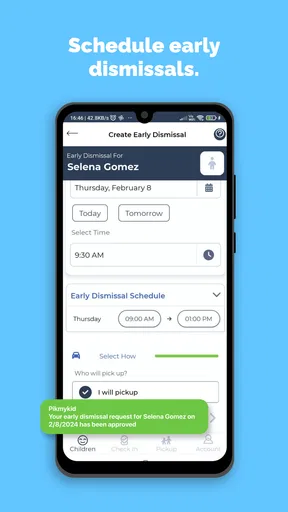
- Pickup changes can be communicated without calling the school.
- Designed around school dismissal routines and parent safety.
Limitations of Pikmykid Parent
- Availability depends on the child’s school using the Pikmykid system.
- Some features may require school approval or administrator setup.
- Notifications may be delayed by weak internet or phone settings.
- Parents may need to update transportation details regularly.
- The interface can feel confusing until the school’s procedures are learned.
Similar Picks in This Category
View All
Google Calendar
Google LLC4.6

Google Drive
Google LLC4.3

Google Assistant
Google LLC3.9

Microsoft OneDrive
Microsoft Corporation4.6

Samsung Calendar
Samsung Electronics Co., Ltd.4.1

Microsoft OneNote: Save Notes
Microsoft Corporation4.6
Frequently Asked Questions
What is Pikmykid Parent, and who is it designed for?
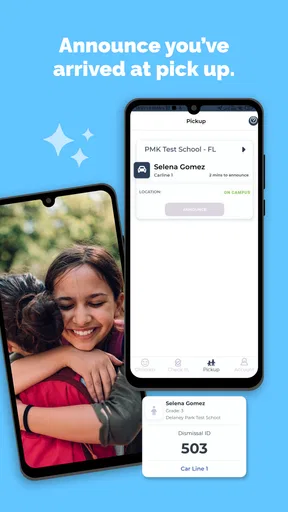
Pikmykid Parent is a school dismissal and student transportation app designed to connect families with participating schools. Parents or guardians can use it to manage pickup arrangements, notify the school when they are on the way, authorize other people to collect their child, and receive dismissal updates. Its available features depend on whether the child’s school has integrated Pikmykid into its dismissal process.
How does Pikmykid Parent help with student pickup and dismissal?
The app is intended to make the end-of-day pickup process more organized. Depending on the school’s setup, parents can select or confirm a dismissal option, indicate that they are arriving, and provide pickup details to school staff. Some schools may also use dismissal queues, carline notifications, or status updates. Parents should follow their school’s instructions because procedures and available tools can vary.
Can another person pick up my child through Pikmykid Parent?
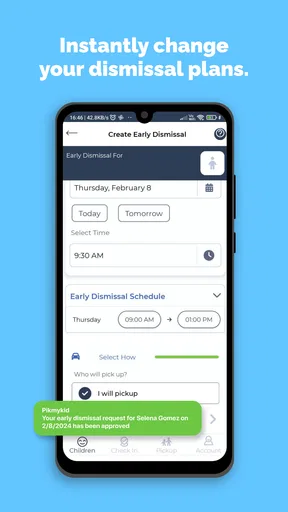
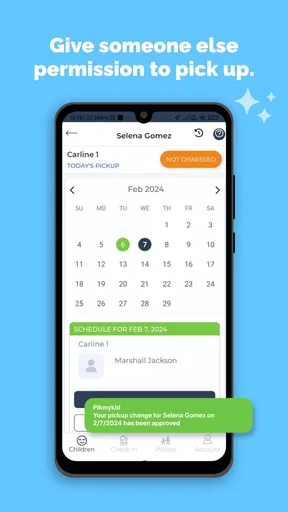
In many school configurations, Pikmykid Parent allows a parent or guardian to add an approved pickup person or make a temporary dismissal change. The person may need to be registered in advance and could be required to show identification at school. Because authorization rules are controlled by the school, parents should review the school’s policy and avoid assuming that an in-app change alone replaces official permission.
Do I need an invitation or school account to use Pikmykid Parent?
Usually, Pikmykid Parent is connected to a participating school, so access commonly requires an invitation, registration details, or a parent account created through the school’s system. Downloading the app does not necessarily provide access to its features without a school connection. If your child or school does not appear after signing in, contact the school office or Pikmykid support rather than creating multiple accounts.
What should I check before downloading and using Pikmykid Parent?
Before downloading Pikmykid Parent, confirm that your child’s school uses the platform and that your phone meets the app’s current Android or iOS requirements. You should also review notification permissions, location-related settings if requested, account privacy information, and the school’s pickup procedures. Keep the app updated, use accurate contact details, and remember that school staff instructions remain the final authority during dismissal.
